Control plane
Control
Users, packages, policy and authorization.
- Browser workspace
- Users and roles
- Packages and recipients
- Access policy
- Lifecycle controls
- Status and activity
The Ripton Cloud platform
Secure, high-speed file transfer. Package preparation, desktop workflows and operational control in one customer-managed platform.
Platform overview
A five-minute overview of the architecture, transfer workflow, administration and automation behind the platform. Open the watch page for chapters and a transcript, or see the 58-second product demo.
Large files rarely move across ideal networks. They move between distant facilities, busy endpoints, cloud environments, partners, and people working against a deadline. When that path slows down or fails, the cost is more than transfer time. Production waits. Compute waits. Decisions wait.
More bandwidth alone does not remove latency, packet loss, storage limits, or operational complexity. And a collection of browser uploads, command-line tools, storage consoles, and manual follow-ups does not create a reliable workflow. Teams still need to know what was sent, who can access it, whether every file arrived, and what happens next.
Ripton Cloud brings those pieces together. It is a high-speed, secure file-transfer platform built for large files and difficult networks. The browser workspace organizes packages, recipients, policies, and status. The transfer layer moves the data through the right path. And the operational layer gives administrators visibility across people, endpoints, and activity.
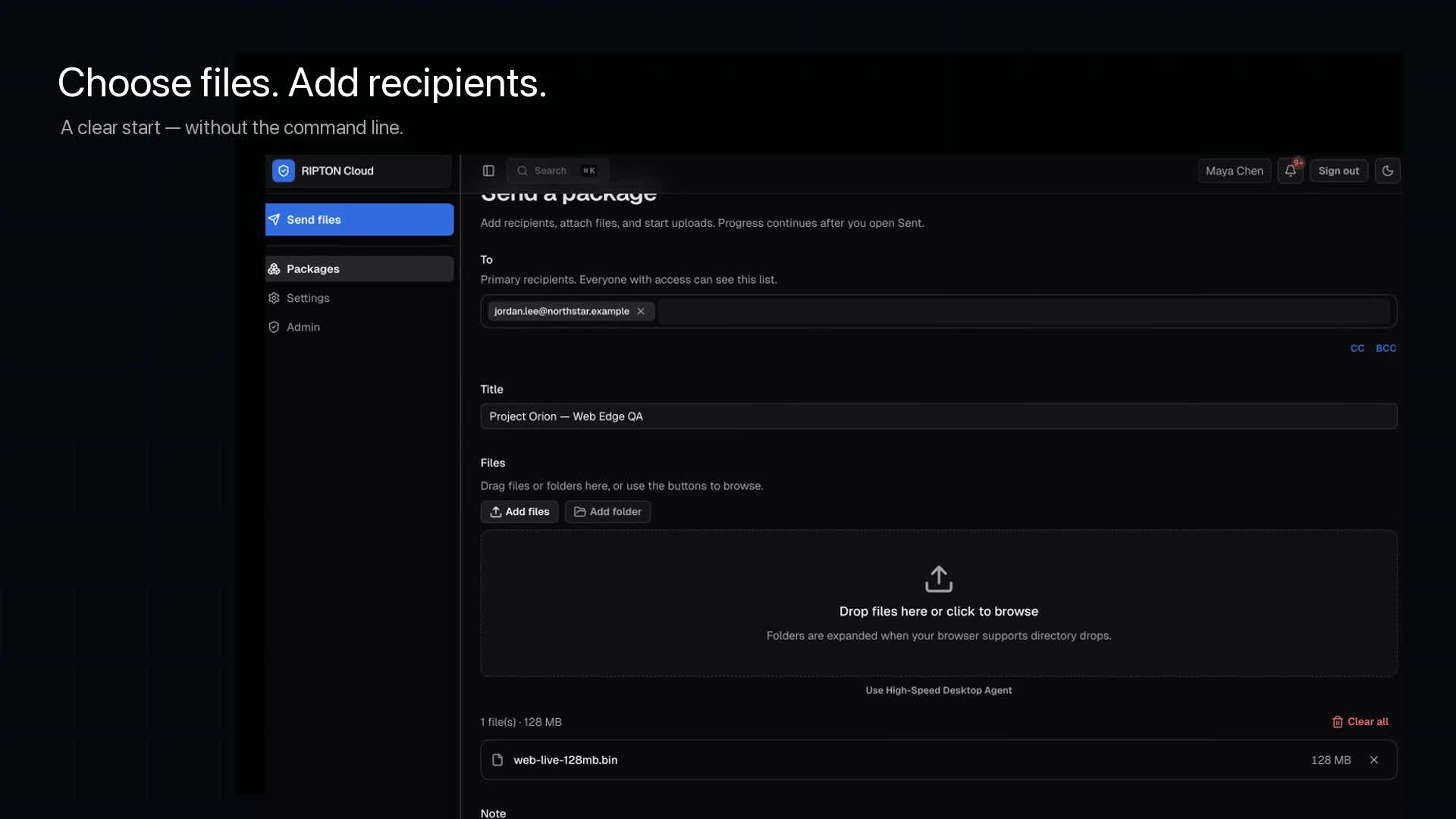
For demanding local workloads, Ripton Desktop provides the primary native path on macOS, Windows, and Linux. A user prepares the package in the browser, selects files through the Desktop application, and starts the transfer without exposing local paths to the web page. Desktop handles the movement and reports progress back into the same workflow. When installing an application is not practical, Web Edge provides a policy-controlled browser path for eligible external and occasional users.
Underneath that experience, Ripton is engineered for difficult network conditions. Transfer data is protected in an authenticated, encrypted session and divided into manageable blocks. Feedback identifies missing work, allowing supported recovery to focus on what still needs to move while preserving completed progress. The outcome is not a universal speed promise; it is a path that can be measured on the files, endpoints, workload and network that matter to you.
Ripton treats delivery as more than a destination address. Send to named recipients, a shared inbox, or a scoped external experience. The workflow continues through notification, policy-aware access, authorized download, forwarding where allowed, and verified completion. Metadata, release timing, expiration, passcodes, download limits, archiving and retention keep the package governed through its lifecycle.
Ripton is deployed into infrastructure your organization manages. Your team controls the application, transfer nodes, storage and data paths, while Ripton Cloud supplies maintained, versioned releases and product updates. Administrators can organize users and workgroups, inspect node and path state, follow progress and recovery, verify completion, and use diagnostics and activity history when a transfer needs attention.
Repeatable work should not require repeatable clicking. Watch folders can detect stable files, create packages, transfer them and archive successful sources. Scoped API clients and documented APIs connect approved systems to supported workflows. Webhooks carry package and system events downstream. The result is automation that remains visible and governed.
Ripton Cloud is built to be evaluated on the path you actually use. Bring your files, endpoints, route and baseline. We will measure the workflow with you, document the conditions and review the result with your technical team. Transfer with confidence. Built for difficult networks.
Platform architecture
Separate policy and authorization from byte movement—then give technical teams the evidence needed to operate both.
Control plane
Users, packages, policy and authorization.
Data plane
Desktop, Web Edge, nodes and relays move package data.
Operational evidence
Administration and evidence for technical teams.
Package lifecycle
One package moves through authorization, transfer, recipient access and completion—without losing the operational context around it.
Choose files or a watched folder.
Add recipients and package controls.
Authorize the transfer.
Use Desktop, Web Edge, nodes or relays.
Recover only missing work after interruption.
Notify the recipient.
Provide secure access and download.
Record delivery, completion and activity.
Product surfaces
Use the platform surface that fits the person, endpoint and workflow without splitting delivery into disconnected tools.
Prepare packages and understand delivery from one workflow.
Users, recipients, package policy, authorization and status.
Explore Browser workspace →Move demanding local workloads without exposing paths to the browser.
Native transfer path for macOS, Windows and Linux.
Explore Ripton Desktop →Give eligible external and occasional users a controlled browser path.
Policy-controlled upload and download through an eligible edge node.
Explore Web Edge →Create a reusable destination for repeat inbound work.
Team and partner submission workflows within current package policy.
Explore Shared Inboxes →Offer scoped upload or download access outside the core workspace.
Public upload and download links with configured access controls.
Explore Public links →Operate people, endpoints and transfer paths with inspectable state.
Users, roles, node state, activity history and diagnostics.
Explore Administration and nodes →Move repeat work into supported schedules, watched workflows, and integrations.
Watch folders, retries, webhooks, scoped API clients, and documented APIs—not a public SDK.
Explore Automation and integrations →Receiving, without the repetition
Give teams and partners a reusable destination with Shared Inboxes. Use scoped public upload and download links where external access is needed, within the configured package controls.
Explore Shared Inboxes →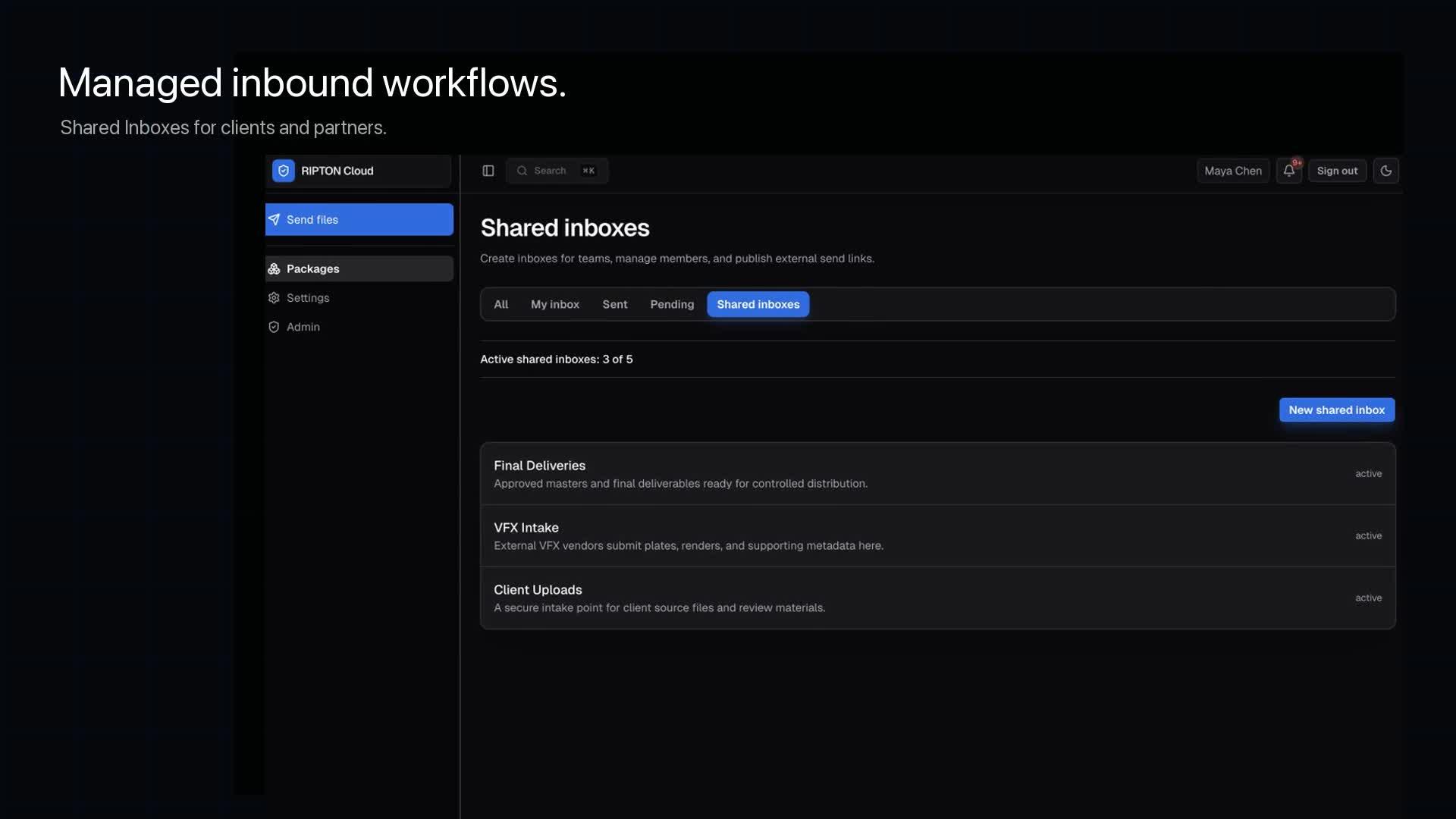
Difficult-network operation
Transfer progress remains visible. Supported recovery can focus on missing ranges while preserving completed work. Technical teams can inspect transfer history and diagnostics when a path needs attention.
Actual results depend on the files, storage, endpoints, network conditions, hardware and configuration across the complete route.
Estimate your transfer path →Why distance costs throughput: the explainer and the arithmetic. How resume works: checkpoint restart explained. How file-heavy packages are stored: one bundle per upload.
Security and package controls
Protection follows the package through preparation, access, delivery and retention rather than appearing as a separate afterthought.
Review the security design →Automation and integrations
Watch folders, scheduled transfers, webhooks, scoped API clients and documented APIs connect repeat work to a visible package lifecycle. Ripton does not present a public SDK.
Supported workflows include event visibility, retry state and operational status.
Customer-managed deployment
Ripton provides a versioned tar package for installation into infrastructure your organization manages. Your team controls deployment timing and operational policy, while Ripton Cloud supplies supported application updates.
People, packages, policy and status.
Endpoint transfer surfaces.
Customer-operated data paths and infrastructure.
Supported, versioned application releases
Industries and use cases
Explore how the same platform applies to the operating pressure in each environment.
Production packages between teams and facilities.
Explore use case →Prepared infrastructure data moving across sites.
Explore use case →Large datasets moving toward compute and collaborators.
Explore use case →Controlled file exchange between participants.
Explore use case →Identity, endpoint and workflow operations.
Explore use case →Builds and asset trees between studios and publishers.
Explore use case →Card offloads and masters from the venue to the network.
Explore use case →Sequencing runs and study data between labs and sponsors.
Explore use case →Corpora and checkpoints between clouds and clusters.
Explore use case →Masters and campaign assets delivered to clients.
Explore use case →Technical evaluation
Use representative files and document the complete environment—not an estimate presented as measured evidence. The two-week proof of concept runs exactly this on one of your routes. Fact-based comparisons: Aspera, Signiant, MASV, FileCatalyst, Resilio, FTP and SFTP, shipping drives and WeTransfer.
Benchmark Your Transfer PathDefine the files, endpoints and route.
Record the existing transfer baseline.
Run the same representative workload through Ripton.
Review throughput, reliability, workflow and operational evidence.
Document the environment and results.
FAQ
Ripton Cloud is secure, high-speed large-file transfer software for file-heavy workloads and difficult network paths. It combines browser workflows, native and browser-based transfer paths, administration, automation and operational visibility in one customer-managed platform.
Customers receive a versioned tar package and install Ripton in infrastructure they manage. The customer controls deployment timing and operational policy; Ripton Cloud supplies supported application updates.
Ripton Desktop is the primary native path for demanding local workloads. Web Edge offers a policy-controlled browser path when installing an application is not practical. Both report into the same package workflow.
Ripton Desktop supports macOS, Windows and Linux.
Progress remains visible and supported recovery focuses on missing ranges while preserving completed work. Transfer history and diagnostics help technical teams understand what happened.
Yes. Current automation capabilities include watch folders, scheduled or automated transfers, webhooks, activity visibility and operational status.
Ripton provides documented APIs and scoped API clients for approved integrations. We do not currently present a public SDK.
A receiver can be notified, securely access the package, download it and forward it where policy allows. The workflow records delivery and completed status.
Ripton can provide an alternative for large-file workflows that need a governed package experience, difficult-network operation and operational evidence. The right comparison depends on your existing route, systems and workflow.
We define the files, endpoints and route, record the existing baseline, run the same representative workload through Ripton and document the conditions. Results depend on files, storage, endpoints, network, hardware and configuration.
Use the Platform Demo form to describe your route and workflow. Your request is saved before you continue to the Calendly scheduling step, with email and scheduling fallbacks available.
Focused technical demonstration
We’ll prepare a focused technical demonstration around your environment and transfer requirements.
Your demonstration request is saved before you continue to Calendly. Scheduling and email fallbacks remain available.